
 Gozar
Drive every route from your desk.
For developers and QA testing location apps: play real routes, detours and GPS failures on real phones, from the phone or your computer.
Other platforms
- Download for Mac Gozar-1.0.2-mac.dmg
- Windows 10+ · 64-bit Gozar-1.0.2-windows-x64-setup.exe
- Windows on ARM Gozar-1.0.2-windows-arm64-setup.exe
- Ubuntu, Debian · .deb gozar_1.0.2_amd64.deb
- Linux ARM · .deb gozar_1.0.2_arm64.deb
- Linux · .tar.gz Gozar-1.0.2-linux-x64.tar.gz
- Linux ARM · .tar.gz Gozar-1.0.2-linux-arm64.tar.gz
Version 1.0.2
Free to start. For development and testing: apps that check for mock locations can still tell.
Testing a route app shouldn't mean driving the route.
- Every route change means another drive around the block with a laptop on the passenger seat.
- The emulator's fake GPS jumps from point to point, so speed, bearing and arrival logic never get a fair test.
- The tunnel bug only shows up when the signal drops at the wrong moment, and you can't make that happen on demand.
From download to a moving dot in 5 minutes.
- Install. Get Gozar on Myket, and the computer app if you test from a computer.
- Allow mock location. Pick Gozar in Developer options once; the app shows you where.
- Pick a place or a route. Search a place, import a GPX, draw one on the map, or get directions along roads.
- Press play. Open the app you're testing and watch it follow.
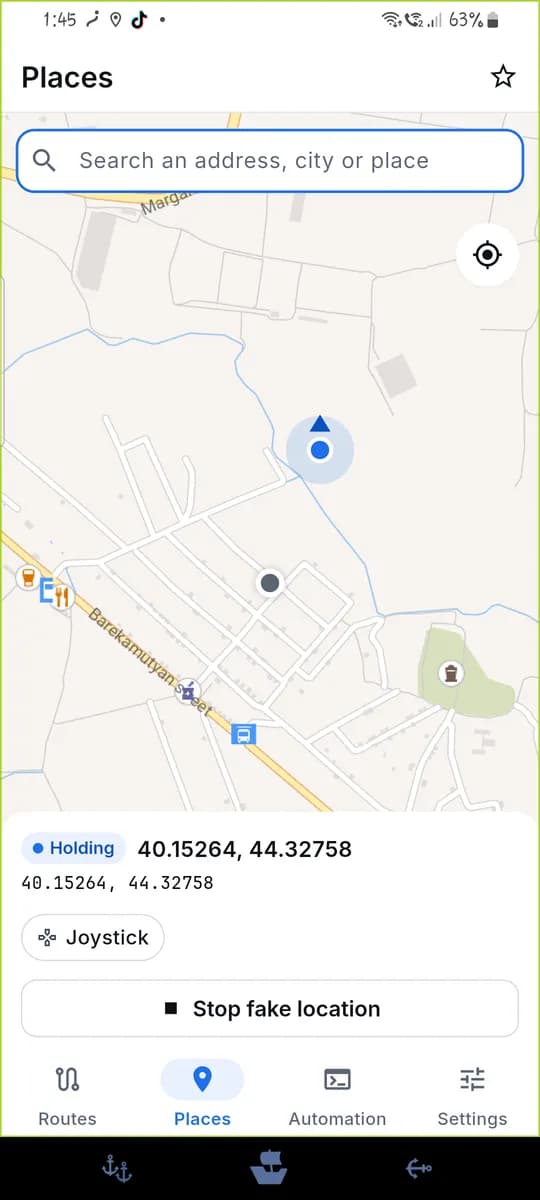
Stand anywhere.
Search an address, a square or a landmark, or tap the map, then Hold here. Every app on the phone is there until you stop. A joystick walks it around; favourites bring it back in one tap.
One search, one tap: no coordinates to type.
Bring your own roads.
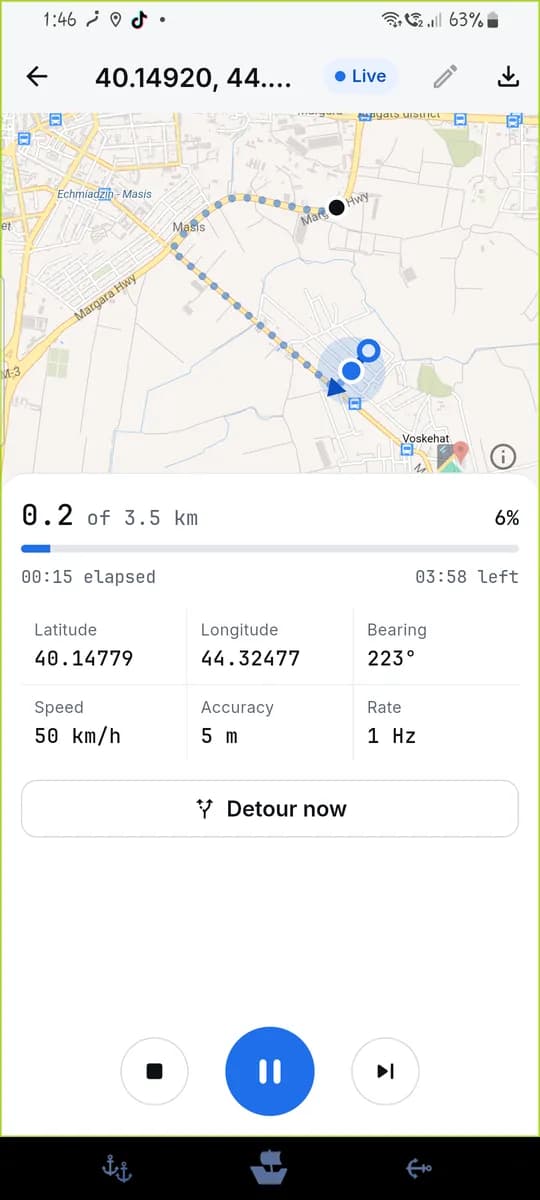
Import KML, KMZ, GPX or GeoJSON from Google My Maps, Earth or a recording, draw one on the map, or get directions along real roads. Play it at any speed, or at the recording's own pace. Loop it, ping-pong it, pause at stops. Edit any route on the map: drag a point, tap the line to add one.
4 file formats, 5 speed profiles, loop or ping-pong, undo while you edit.
Drive to the pickup. Wait. Drive on.
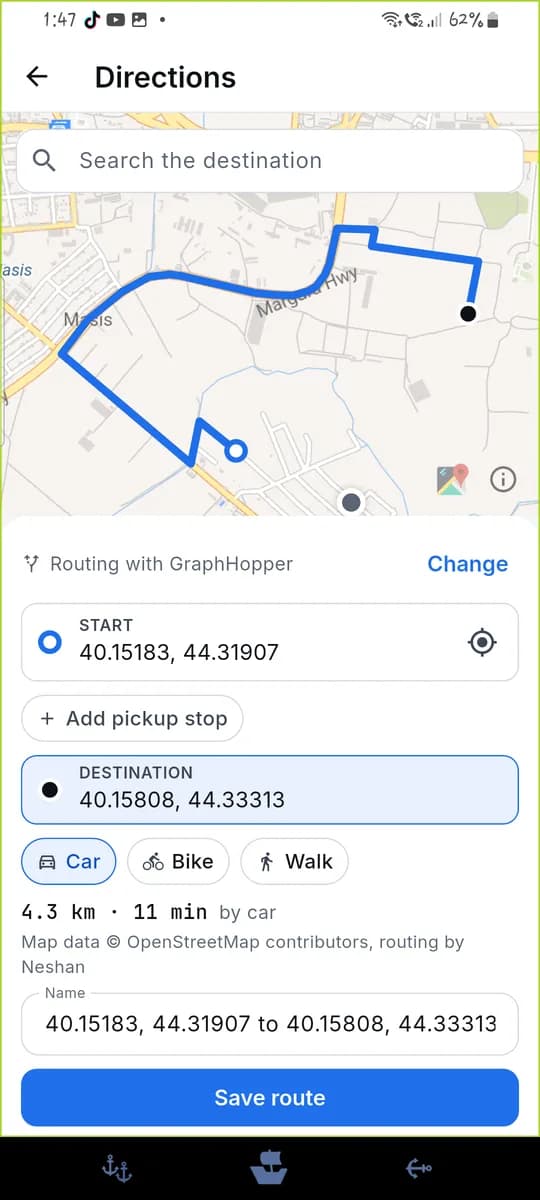
Testing a ride or delivery app? Pick a start, a pickup and a destination, and Gozar routes along real roads. It waits at the pickup while your driver app taps Picked up, then drives on, so the rider app sees the car move the whole way.
Neshan, GraphHopper or your own OSRM server, with your own key. Places suggest as you type, or tap the map, or start from where you are. Car, bike or walk.
Leave the route. See who notices.
Your app should spot that the phone went off route and plan a new one. Take a detour now, or let it turn off where the side road starts; it rejoins the route ahead. Plan it before you start, or tap Detour now mid-ride.
Or long-press the map while it drives (right-click on the computer). Go here heads there along roads and ends the trip; Go via here goes there, then on to the destination.
Break GPS on purpose.
Real phones lose the signal in tunnels and drift between buildings. Make it happen on cue, at a time or at a stop, and watch your app cope. (The line breaks here: that's signal loss.)
6 failure types, from 30 s signal loss to 150 m drift.
One computer, every phone.
The computer app plays to Android phones over adb and to iPhones over USB or Wi-Fi, with nothing to install on the iPhone. Android gets every scenario; iPhone gets routes, detours and position scenarios.
An Android phone starts playing from the computer in about 5 seconds.
Script the whole trip.
Every button is also an HTTP call on 127.0.0.1 and a CLI command, on the phone and on the computer. Put it in your test suite and let the route drive itself. gozar wait exits 0 on arrival, so a test can wait for the trip to finish.
$ gozar play "Tajrish to Vanak" --speed 60 --device "Galaxy A31"
$ gozar detour "Side street" --leave start
$ gozar via 35.7880 51.4290 # reroute through there
$ gozar wait --timeout 600 # exits 0 on arrival
finished

$ curl -X POST localhost:8766/place -d '{"lat":35.6997,"lng":51.3381}'
{"holding":"Azadi Tower","device":"Galaxy A31"}Questions.
Will the app I'm testing know the location is fake?
It can, if it checks Android's mock location flag; Gozar is made for testing your own apps, not for fooling other people's. If your app blocks mock locations, test with that check switched off in a debug build.
Do I need to root anything?
No. Android uses the mock location setting in Developer options. iPhone uses Apple's developer tools through the computer app: turn on Developer Mode once, with nothing installed on the phone.
Do I need a key for directions?
Only for Directions and live reroutes. They use Neshan, GraphHopper or your own OSRM server, with your own key, added in Settings › Routing. Everything else works without one.
Where do my routes and places go?
They stay on your device. The only outside calls are map tiles, place search and suggestions (OpenStreetMap services), and, when you use Directions or a reroute, the routing service you chose. The control API listens on 127.0.0.1 only, so nothing on your network can drive your phone.
macOS says it can't check the app for malware. Is it safe?
The Mac app isn't notarized by Apple yet, so macOS asks before the first open. Right-click the app and choose Open.
Why did the phone's clock change?
With Automatic time zone on, Android (Samsung especially) takes the time zone from the location: play a route in another city and the clock follows. It comes back when you stop; to avoid it, turn off Automatic time zone in Settings › General management › Date and time.
Fares.
Free to ride. Pay when your tests need detours, failures or a script.
Free
- Places, search and joystick
- Import and play routes
- 3 saved routes
- Loop and ping-pong
- GPX export
Pro
- Unlimited routes and backup
- Detours and live reroutes
- All scenarios
- Record and replay
- Original timing
- Computer to the phone
- Local API and CLI
- KML export
Team
- Everything in Pro on every device
- One account for the whole team
- Moves to a new device: as many a month as devices
- A year: 650,000 a computer, 325,000 a phone
Buy in the app: on Android with Myket, on the computer in its Plans page. Prices may change; a change never affects a purchase already made.
Your next route test doesn't need a car.
Other platforms
- Download for Mac Gozar-1.0.2-mac.dmg
- Windows 10+ · 64-bit Gozar-1.0.2-windows-x64-setup.exe
- Windows on ARM Gozar-1.0.2-windows-arm64-setup.exe
- Ubuntu, Debian · .deb gozar_1.0.2_amd64.deb
- Linux ARM · .deb gozar_1.0.2_arm64.deb
- Linux · .tar.gz Gozar-1.0.2-linux-x64.tar.gz
- Linux ARM · .tar.gz Gozar-1.0.2-linux-arm64.tar.gz
Version 1.0.2
Free to start: no card needed.